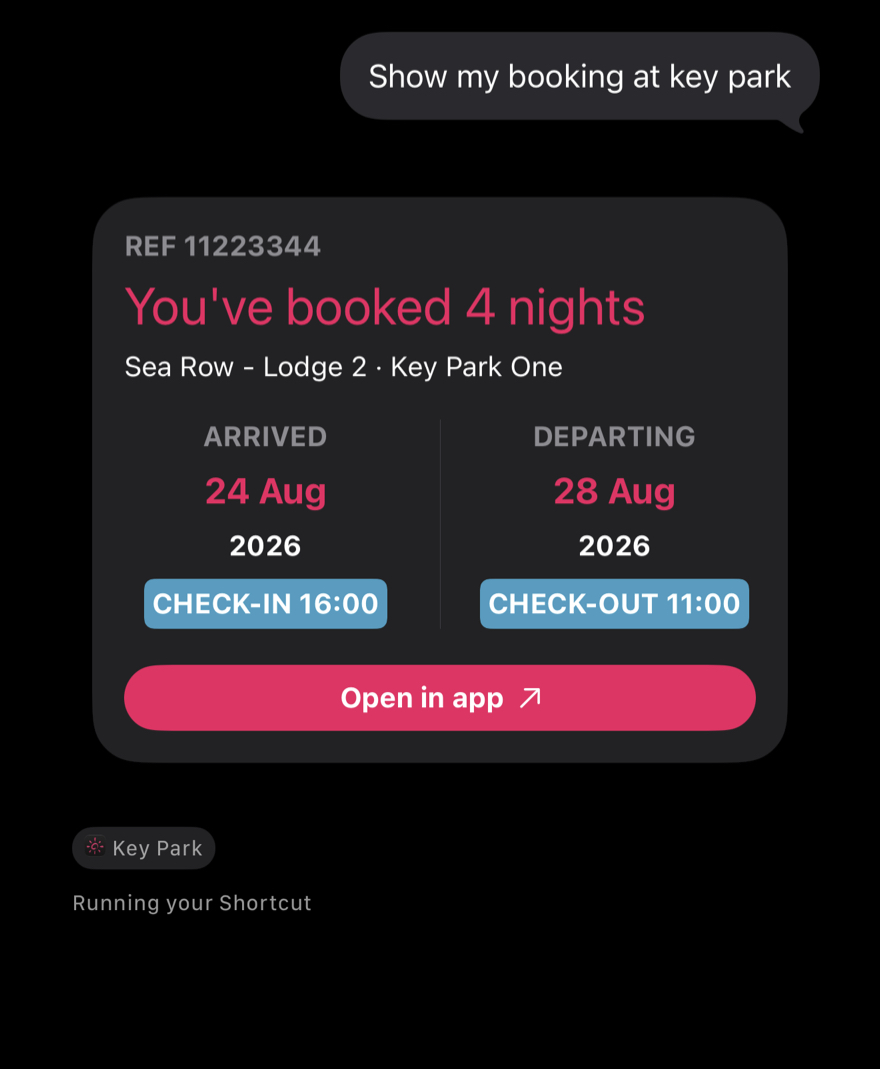
Guests who are logged in and have a booking can ask Siri for their stay details. Siri reads back a short summary and shows a card on screen. Because a booking is personal, this is the one shortcut that still asks the guest to unlock their phone first.
Guest asks Siri
“Show my booking at [app name]” or “what’s my booking at [app name]?”
Siri replies
A short spoken summary — the number of nights, the park, the arrival date, and whether a balance is due or the booking is fully paid. For example: “Your 3-night stay at [park name] starts 14 Jun. A balance of £120.00 is due.”
A card appears on screen
The full details appear as a card under the spoken reply, with an image of the accommodation where one’s available.
Where the information comes from
The booking information comes directly from the guest’s account — it’s the same data they’d see inside the app. If a guest says the details shown are wrong, that’s worth investigating in their account rather than treating as a Siri issue.
If there’s nothing to show
If they’re not logged in or don’t have a booking linked to their account, Siri will tell them nothing was found and suggest they open the app.
Info
Tapping a booking result in Spotlight opens the booking itself directly. A booking in Spotlight is searchable by reference number only, not by lodge, pitch, or site name, to keep that lookup private — and a guest’s unit location is never shared with Spotlight.